- You can Activate GB-Key software for all Infinity-Box products
- You can Activate GPG-Workshop software for all Infinity-Box products
- You can Activate SPT-Box software for all Infinity-Box products

What is Online Service and Infinity-Credits

     Online Service and Infinity-Credits is an universal system that helps you get more software and service online (free and paid features available). What you can do with Infinity-Credits and Online Service:
  • Get Unlock Codes Online for Pantech, BlackBerry, INQ, SL3 phones and probably other models in future
  • Activate BB5 Easy Service Tool [BEST] software for your Main Infinity-Box
  • Activate CDMA-Tool software for your Main Infinity-Box
  • Activate Language Pack & Resource Editor software for your Main Infinity-Box
  • Activate Content Extractor software for your Main Infinity-Box
  • Activate SPT-Box software, access SPT-Box support area and have full support right after you activate this option for your Infinity-Box products
  • Activate SPT-Box software online for your USTPRO2 box via Infinity-Credits - give a new life to your USTPRO2 box and use SPT-Box software with your old USTPRO2 smart-card
  • Activate GB-Key software, access GB-Key support area and use new software instantly right after you activate this option for your Infinity-Box products
  • Activate GPG-Workshop software, access GPG-Workshop support area and use new software instantly right after you activate this option for your Infinity-Box products
  • Activate more other software online for your Infinity-Box products via Infinity-Credits system
  • Sell software Activations and Infinity-Credits to other users - become a Reseller easily without big investments, create new own users etc.
Software activation advantages for professional people:
  • One small Dongle (Smart-Card) with many software products inside
  • Fast online software activation
  • Instant software delivery
  • Zero delivery cost
  • Secure activation process
  • Exactly the same features as original boxed products
  • Exactly the same support as original boxed products
How to use Online Service and Infinity-Credits

All Infinity-Box users has Online Service option activated by default.

1. Read step-by-step instrustion how to login and use Online Service and Infinity-Credits
2. Connect dongle/box to PC
3. Download and run "Dongle Manager" v1.42 or higher !
4. Select required project (box type)

Select project

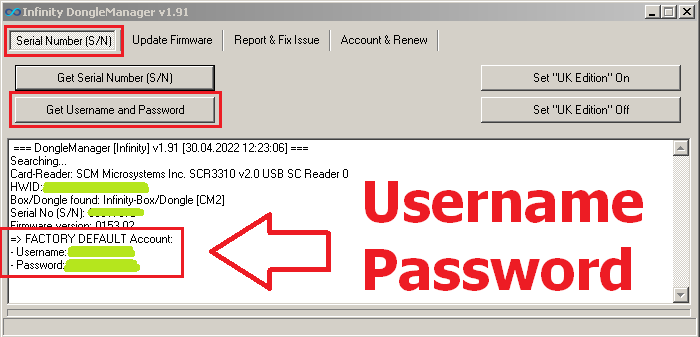
5. Click to "Read dongle serial number (S/N)" button, you will see Online Service login and password

Online Service Login & Password

5. Login to Online Service with given login and password

Online Service link

Note: Do not share your login/password with anyone ! Once we will detect that your account was accessed from different IP at the same time your account will be closed and dongle will be blocked !
You was warned, we take no responsibility for any kind of closed accounts and blocked dongles !

Documentation

- How to login and use Online Service and Infinity-Credits, how to activate more software
- how to activate SPT-Box software for your Infinity-Box products
- How to activate SPT-Box software for your USTPRO2 smart-card
- How to activate GB-Key software for your Infinity-Box products
- How to activate GPG-Workshop software for your Infinity-Box products
 
(c) Infinity-Box 2005-2012